第136题 如何设计一个前端统计SDK
- 前端统计的范围
- 访问量
PV - 自定义事件
- 性能,错误
- 访问量
    // 统计sdk

    const PV_URL_SET = new Set()

    class MyStatistic {
      constructor(productId) {
        this.productId = productId

        // 内部处理
        this.initPerformance() // 性能统计
        this.initError() // 错误监控
      }

      // 发送统计数据
      send(url, params = {}) {
        params.productId = productId

        const paramArr = []
        for (let key in params) {
          const val = params[key]
          paramArr.push(`${key}=${value}`)
        }

        const newUrl = `${url}?${paramArr.join('&')}` // url?a=10&b=20

        // 用 <img> 发送:1. 可跨域;2. 兼容性非常好
        const img = document.createElement('img')
        img.src = newUrl // get
      }

      // 初始化性能统计
      initPerformance() {
        const url = 'yyy'
        this.send(url, performance.timing) // 给最原始的、完整的结果,原始数据。让服务端加工处理
      }

      // 初始化错误监控
      initError() {
        window.addEventListener('error', event => {
          const { error, lineno, colno } = event
          this.error(error, { lineno, colno })
        })
        // Promise 未 catch 住的报错
        window.addEventListener('unhandledrejection', event => {
          this.error(new Error(event.reason), { type: 'unhandledrejection' })
        })
      }

      pv() {
        const href = location.href
        if (PV_URL_SET.get(href)) return // 不重复发送 pv

        this.event('pv')

        PV_URL_SET.add(href)
      }

      event(key, val) {
        const url = 'xxx' // 自定义事件统计 server API
        this.send(url, {key, val})
      }

      error(err, info = {}) {
        const url = 'zzz'
        const { message, stack } = err
        this.send(url, { message, stack, ...info  })
      }
    }

    // const s = new MyStatistic('a1') // 最好在DOMContentLoaded的时候在初始化
    // s.pv() // 用户主动发送 SPA 路由切换 PV

    // 用户自行发送自定义事件
    // s.event('vip', 'close')

    // 用户处理try catch
    // try {
    // } catch(ex) {
    //     s.error(ex, {})
    // }

    // 在vue、react单独监听配置的错误的配置 也可以s.error单独发过去。跟try catch一样的
连环问:sourcemap有何作用,如何配置
有js报错,可能会问sourcemap相关问题
- sourcemap作用
JS上线时要压缩、混淆- 线上的
JS报错信息,将无法识别行、列 sourcemap即可解决这个问题
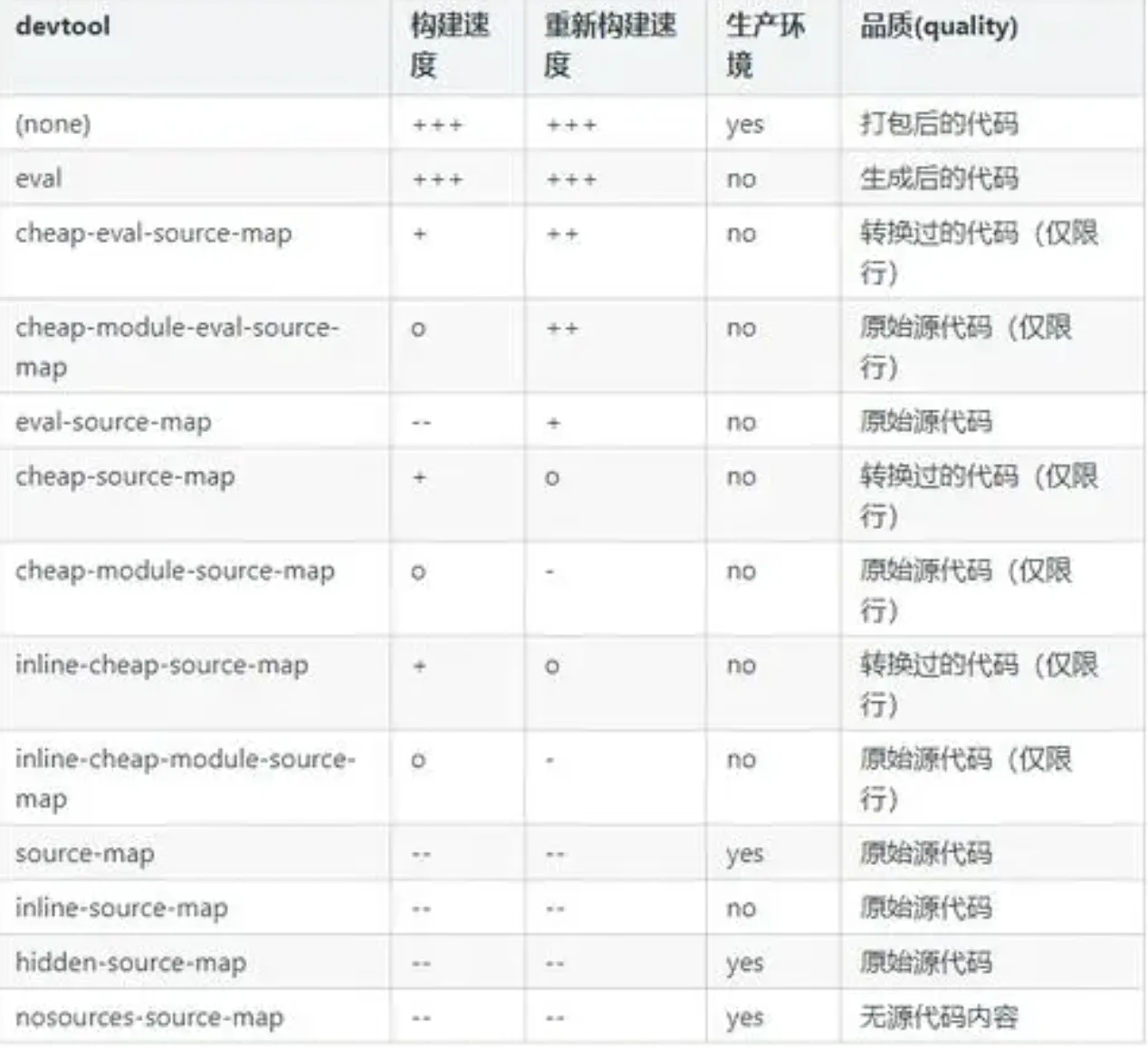
webpack通过devtool配置sourcemapeval:JS在eval(...)中,不生成sourcemapsource-map:生成单独的map文件,并在JS最后指定eval-source-map:JS在eval(...)中,sourcemap内嵌inline-source-map:sourcemap内嵌到JS中,不是单独文件cheap-source-map:sourcemap中只有行信息,没有列eval-cheap-source-map:JS在eval(...)中,没有独立的sourcemap文件,cheap-source-map只有行没有列- 总结
- 开发环境使用
eval效率高:eval、eval-source-map、eval-cheap-source-map - 线上环境使用:
source-map生成单独的map文件(不要泄露sourcemap文件)
- 开发环境使用