
第147题 手写一个LazyMan,实现sleep机制
- 支持
sleep和eat两个方法 - 支持链式调用
    // LazyMan示例

    const me = new LazyMan('张三')
    me.eat('苹果').eat('香蕉').sleep(5).eat('葡萄')

    // 打印
    // 张三 eat 苹果
    // 张三 eat 香蕉
    // 等待5秒
    // 张三 eat 葡萄
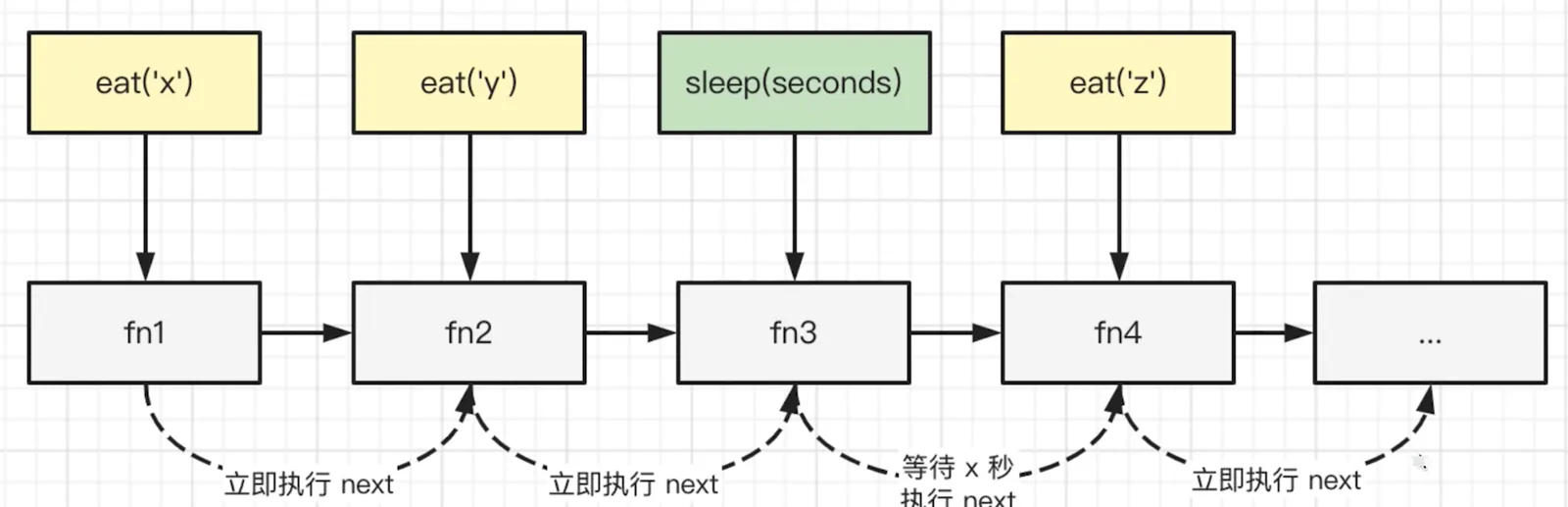
思路
- 由于有
sleep功能,函数不能直接在调用时触发 - 初始化一个列表,把函数注册进去
- 由每个
item触发next执行(遇到sleep则异步触发,使用setTimeout)
    /**
     * @description lazy man
     */

    class LazyMan {
        constructor(name) {
            this.name = name

            this.tasks = [] // 任务列表

            // 等注册完后在初始执行next
            setTimeout(() => {
                this.next()
            })
        }

        next() {
            const task = this.tasks.shift() // 取出当前 tasks 的第一个任务
            if (task) task()
        }

        eat(food) {
            const task = () => {
                console.info(`${this.name} eat ${food}`)
                this.next() // 立刻执行下一个任务
            }
            this.tasks.push(task)

            return this // 链式调用
        }

        sleep(seconds) {
            const task = () => {
                console.info(`${this.name} 开始睡觉`)
                setTimeout(() => {
                    console.info(`${this.name} 已经睡完了 ${seconds}s,开始执行下一个任务`)
                    this.next() // xx 秒之后再执行下一个任务
                }, seconds * 1000)
            }
            this.tasks.push(task)

            return this // 链式调用
        }
    }
    // 测试

    const me = new LazyMan('张三')
    me.eat('苹果').eat('香蕉').sleep(2).eat('葡萄').eat('西瓜').sleep(2).eat('橘子')