
第180题 webpack性能优化-构建速度
先分析遇到哪些问题,在配合下面的方法优化,不要上来就回答,让人觉得背面试题
- 优化
babel-loader缓存 IgnorePlugin忽略某些包,避免引入无用模块(直接不引入,需要在代码中引入)noParse避免重复打包(引入但不打包)happyPack多线程打包- JS单线程的,开启多进程打包
- 提高构建速度(特别是多核
CPU)
parallelUglifyPlugin多进程压缩JS- 关于多进程
- 项目较大,打包较慢,开启多进程能提高速度
- 项目较小,打包很快,开启多进程反而会降低速度(进程开销)
- 按需使用
- 关于多进程
- 自动刷新(开发环境)
- 热更新(开发环境)
- 自动刷新:整个网页全部刷新,速度较慢,状态会丢失
- 热更新:新代码生效,网页不刷新,状态不丢失
DllPlugin动态链接库(dllPlugin只适用于开发环境,因为生产环境下打包一次就完了,没有必要用于生产环境)- 前端框架如
react、vue体积大,构建慢 - 较稳定,不常升级版本,同一个版本只构建一次,不用每次都重新构建
webpack已内置DllPlugin,不需要安装DllPlugin打包出dll文件DllReferencePlugin引用dll文件
- 前端框架如
优化babel-loader
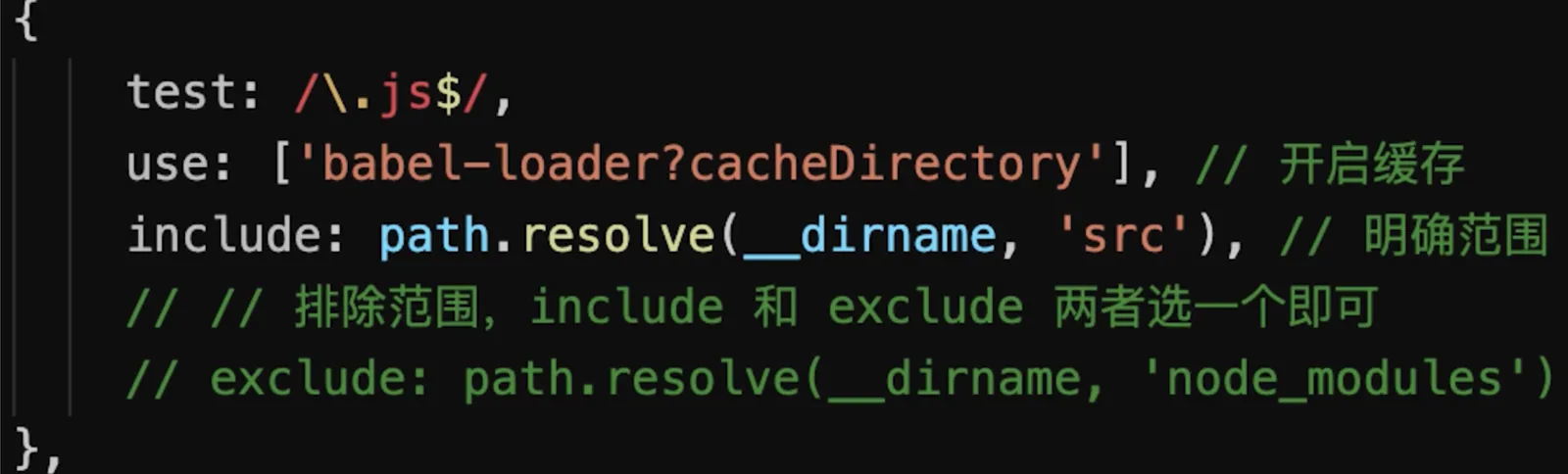
IgnorePlugin
import moment from 'moment'- 默认会引入所有语言JS代码,代码过大
    import moment from 'moment'
    moment.locale('zh-cn') // 设置语言为中文

    // 手动引入中文语言包
    import 'moment/locale/zh-cn'
    // webpack.prod.js
    plugins: [
        // 忽略 moment 下的 /locale 目录
        new webpack.IgnorePlugin(/\.\/locale/, /moment/),
    ]
noParse
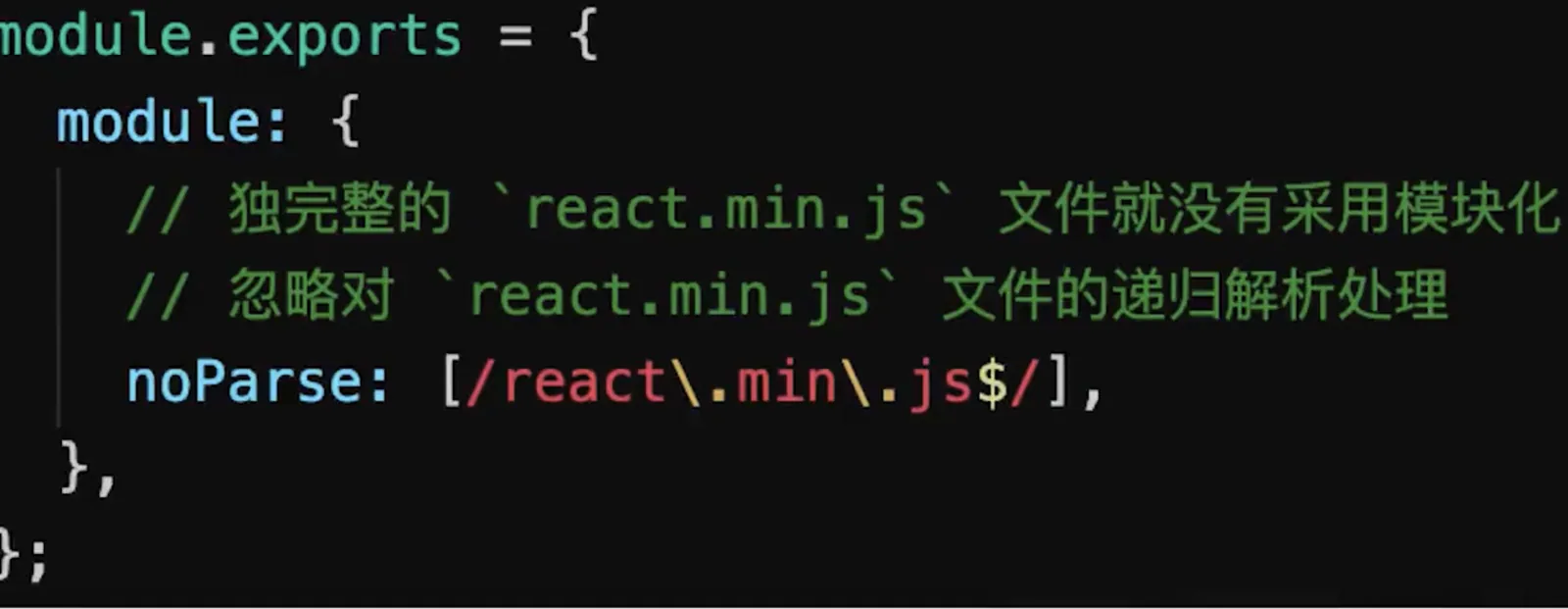
happyPack
    // webpack.prod.js
    const HappyPack = require('happypack')

    {
        module: {
            rules: [
                // js
                {
                    test: /\.js$/,
                    // 把对 .js 文件的处理转交给 id 为 babel 的 HappyPack 实例
                    use: ['happypack/loader?id=babel'],
                    include: srcPath,
                    // exclude: /node_modules/
                },
            ]
        },
        plugins: [
          // happyPack 开启多进程打包
          new HappyPack({
            // 用唯一的标识符 id 来代表当前的 HappyPack 是用来处理一类特定的文件
            id: 'babel',
            // 如何处理 .js 文件,用法和 Loader 配置中一样
            loaders: ['babel-loader?cacheDirectory']
          }),
        ]
    }
parallelUglifyPlugin
    // webpack.prod.js
    const ParallelUglifyPlugin = require('webpack-parallel-uglify-plugin')

    {
        plugins: [
            // 使用 ParallelUglifyPlugin 并行压缩输出的 JS 代码
            new ParallelUglifyPlugin({
                // 传递给 UglifyJS 的参数
                // (还是使用 UglifyJS 压缩,只不过帮助开启了多进程)
                uglifyJS: {
                    output: {
                        beautify: false, // 最紧凑的输出
                        comments: false, // 删除所有的注释
                    },
                    compress: {
                        // 删除所有的 `console` 语句,可以兼容ie浏览器
                        drop_console: true,
                        // 内嵌定义了但是只用到一次的变量
                        collapse_vars: true,
                        // 提取出出现多次但是没有定义成变量去引用的静态值
                        reduce_vars: true,
                    }
                }
            })
        ]
    }
自动刷新
使用
dev-server即可
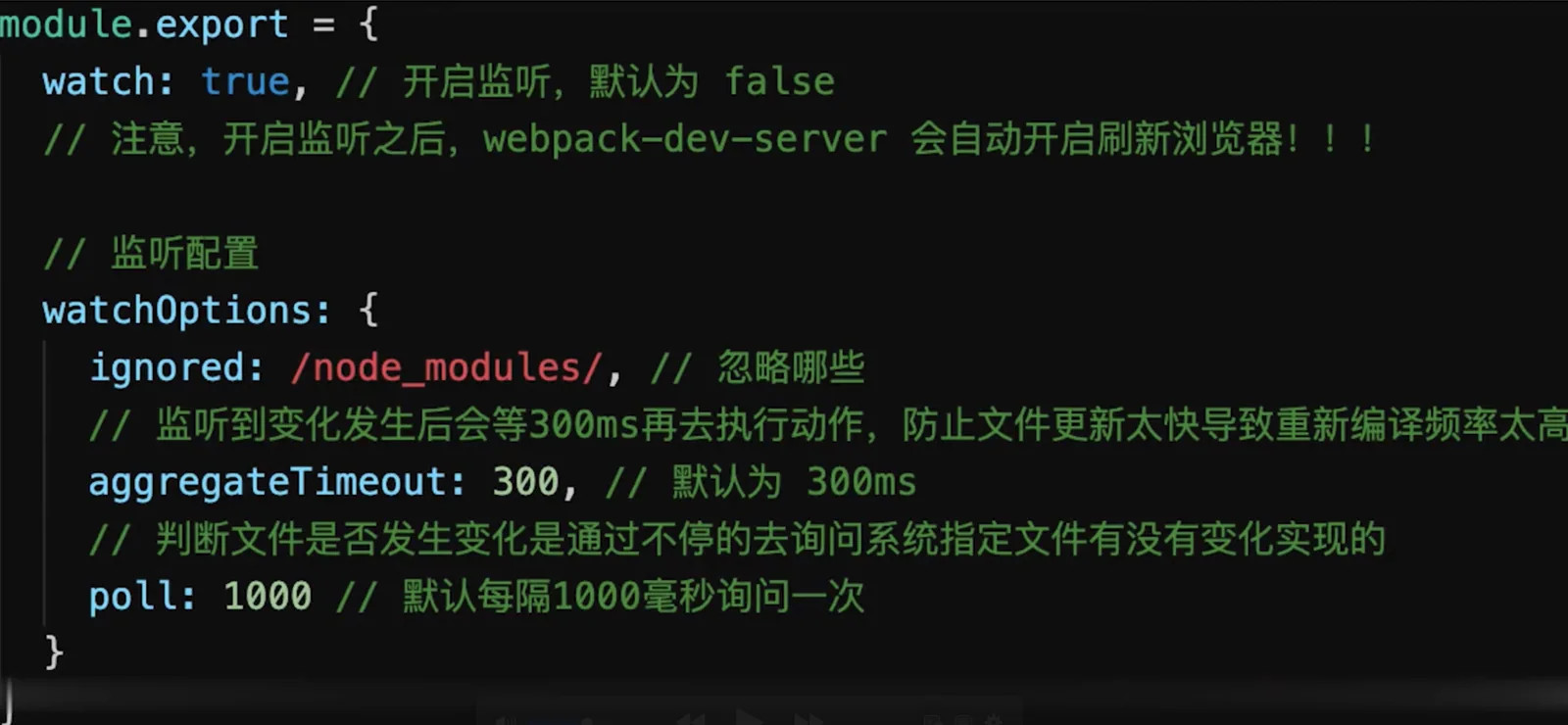
热更新
    // webpack.dev.js
    const HotModuleReplacementPlugin = require('webpack/lib/HotModuleReplacementPlugin');

    entry: {
        // index: path.join(srcPath, 'index.js'),
        index: [
            'webpack-dev-server/client?http://localhost:8080/',
            'webpack/hot/dev-server',
            path.join(srcPath, 'index.js')
        ],
        other: path.join(srcPath, 'other.js')
    },
    devServer: {
        hot: true
    },
    plugins: [
        new HotModuleReplacementPlugin()
    ],
    // 代码中index.js

    // 增加,开启热更新之后的代码逻辑
    if (module.hot) {
        // 注册哪些模块需要热更新
        module.hot.accept(['./math'], () => {
            const sumRes = sum(10, 30)
            console.log('sumRes in hot', sumRes)
        })
    }
优化打包速度完整代码
    // webpack.common.js

    const path = require('path')
    const HtmlWebpackPlugin = require('html-webpack-plugin')
    const { srcPath, distPath } = require('./paths')

    module.exports = {
        entry: {
            index: path.join(srcPath, 'index.js'),
            other: path.join(srcPath, 'other.js')
        },
        module: {
            rules: [
                // babel-loader
            ]
        },
        plugins: [
            // new HtmlWebpackPlugin({
            //     template: path.join(srcPath, 'index.html'),
            //     filename: 'index.html'
            // })

            // 多入口 - 生成 index.html
            new HtmlWebpackPlugin({
                template: path.join(srcPath, 'index.html'),
                filename: 'index.html',
                // chunks 表示该页面要引用哪些 chunk (即上面的 index 和 other),默认全部引用
                chunks: ['index', 'vendor', 'common']  // 要考虑代码分割
            }),
            // 多入口 - 生成 other.html
            new HtmlWebpackPlugin({
                template: path.join(srcPath, 'other.html'),
                filename: 'other.html',
                chunks: ['other', 'vendor', 'common']  // 考虑代码分割
            })
        ]
    }
    // webpack.dev.js
    const path = require('path')
    const webpack = require('webpack')
    const webpackCommonConf = require('./webpack.common.js')
    const { smart } = require('webpack-merge')
    const { srcPath, distPath } = require('./paths')
    const HotModuleReplacementPlugin = require('webpack/lib/HotModuleReplacementPlugin');

    module.exports = smart(webpackCommonConf, {
        mode: 'development',
        entry: {
            // index: path.join(srcPath, 'index.js'),
            index: [
                'webpack-dev-server/client?http://localhost:8080/',
                'webpack/hot/dev-server',
                path.join(srcPath, 'index.js')
            ],
            other: path.join(srcPath, 'other.js')
        },
        module: {
            rules: [
                {
                    test: /\.js$/,
                    loader: ['babel-loader?cacheDirectory'],
                    include: srcPath,
                    // exclude: /node_modules/
                },
                // 直接引入图片 url
                {
                    test: /\.(png|jpg|jpeg|gif)$/,
                    use: 'file-loader'
                },
                // {
                //     test: /\.css$/,
                //     // loader 的执行顺序是:从后往前
                //     loader: ['style-loader', 'css-loader']
                // },
                {
                    test: /\.css$/,
                    // loader 的执行顺序是:从后往前
                    loader: ['style-loader', 'css-loader', 'postcss-loader'] // 加了 postcss
                },
                {
                    test: /\.less$/,
                    // 增加 'less-loader' ,注意顺序
                    loader: ['style-loader', 'css-loader', 'less-loader']
                }
            ]
        },
        plugins: [
            new webpack.DefinePlugin({
                // window.ENV = 'production'
                ENV: JSON.stringify('development')
            }),
            new HotModuleReplacementPlugin()
        ],
        devServer: {
            port: 8080,
            progress: true,  // 显示打包的进度条
            contentBase: distPath,  // 根目录
            open: true,  // 自动打开浏览器
            compress: true,  // 启动 gzip 压缩

            hot: true,

            // 设置代理
            proxy: {
                // 将本地 /api/xxx 代理到 localhost:3000/api/xxx
                '/api': 'http://localhost:3000',

                // 将本地 /api2/xxx 代理到 localhost:3000/xxx
                '/api2': {
                    target: 'http://localhost:3000',
                    pathRewrite: {
                        '/api2': ''
                    }
                }
            }
        },
        // watch: true, // 开启监听,默认为 false
        // watchOptions: {
        //     ignored: /node_modules/, // 忽略哪些
        //     // 监听到变化发生后会等300ms再去执行动作,防止文件更新太快导致重新编译频率太高
        //     // 默认为 300ms
        //     aggregateTimeout: 300,
        //     // 判断文件是否发生变化是通过不停的去询问系统指定文件有没有变化实现的
        //     // 默认每隔1000毫秒询问一次
        //     poll: 1000
        // }
    })
    // webpack.prod.js
    const path = require('path')
    const webpack = require('webpack')
    const { smart } = require('webpack-merge')
    const { CleanWebpackPlugin } = require('clean-webpack-plugin')
    const MiniCssExtractPlugin = require('mini-css-extract-plugin')
    const TerserJSPlugin = require('terser-webpack-plugin')
    const OptimizeCSSAssetsPlugin = require('optimize-css-assets-webpack-plugin')
    const HappyPack = require('happypack')
    const ParallelUglifyPlugin = require('webpack-parallel-uglify-plugin')
    const webpackCommonConf = require('./webpack.common.js')
    const { srcPath, distPath } = require('./paths')

    module.exports = smart(webpackCommonConf, {
        mode: 'production',
        output: {
            // filename: 'bundle.[contentHash:8].js',  // 打包代码时,加上 hash 戳
            filename: '[name].[contentHash:8].js', // name 即多入口时 entry 的 key
            path: distPath,
            // publicPath: 'http://cdn.abc.com'  // 修改所有静态文件 url 的前缀(如 cdn 域名),这里暂时用不到
        },
        module: {
            rules: [
                // js
                {
                    test: /\.js$/,
                    // 把对 .js 文件的处理转交给 id 为 babel 的 HappyPack 实例
                    use: ['happypack/loader?id=babel'],
                    include: srcPath,
                    // exclude: /node_modules/
                },
                // 图片 - 考虑 base64 编码的情况
                {
                    test: /\.(png|jpg|jpeg|gif)$/,
                    use: {
                        loader: 'url-loader',
                        options: {
                            // 小于 5kb 的图片用 base64 格式产出
                            // 否则,依然延用 file-loader 的形式,产出 url 格式
                            limit: 5 * 1024,

                            // 打包到 img 目录下
                            outputPath: '/img1/',

                            // 设置图片的 cdn 地址(也可以统一在外面的 output 中设置,那将作用于所有静态资源)
                            // publicPath: 'http://cdn.abc.com'
                        }
                    }
                },
                // 抽离 css
                {
                    test: /\.css$/,
                    loader: [
                        MiniCssExtractPlugin.loader,  // 注意,这里不再用 style-loader
                        'css-loader',
                        'postcss-loader'
                    ]
                },
                // 抽离 less
                {
                    test: /\.less$/,
                    loader: [
                        MiniCssExtractPlugin.loader,  // 注意,这里不再用 style-loader
                        'css-loader',
                        'less-loader',
                        'postcss-loader'
                    ]
                }
            ]
        },
        plugins: [
            new CleanWebpackPlugin(), // 会默认清空 output.path 文件夹
            new webpack.DefinePlugin({
                // window.ENV = 'production'
                ENV: JSON.stringify('production')
            }),

            // 抽离 css 文件
            new MiniCssExtractPlugin({
                filename: 'css/main.[contentHash:8].css'
            }),

            // 忽略 moment 下的 /locale 目录
            new webpack.IgnorePlugin(/\.\/locale/, /moment/),

            // happyPack 开启多进程打包
            new HappyPack({
                // 用唯一的标识符 id 来代表当前的 HappyPack 是用来处理一类特定的文件
                id: 'babel',
                // 如何处理 .js 文件,用法和 Loader 配置中一样
                loaders: ['babel-loader?cacheDirectory']
            }),

            // 使用 ParallelUglifyPlugin 并行压缩输出的 JS 代码
            new ParallelUglifyPlugin({
                // 传递给 UglifyJS 的参数
                // (还是使用 UglifyJS 压缩,只不过帮助开启了多进程)
                uglifyJS: {
                    output: {
                        beautify: false, // 最紧凑的输出
                        comments: false, // 删除所有的注释
                    },
                    compress: {
                        // 删除所有的 `console` 语句,可以兼容ie浏览器
                        drop_console: true,
                        // 内嵌定义了但是只用到一次的变量
                        collapse_vars: true,
                        // 提取出出现多次但是没有定义成变量去引用的静态值
                        reduce_vars: true,
                    }
                }
            })
        ],

        optimization: {
            // 压缩 css
            minimizer: [new TerserJSPlugin({}), new OptimizeCSSAssetsPlugin({})],

            // 分割代码块
            splitChunks: {
                chunks: 'all',
                /**
                 * initial 入口chunk,对于异步导入的文件不处理
                    async 异步chunk,只对异步导入的文件处理
                    all 全部chunk
                 */

                // 缓存分组
                cacheGroups: {
                    // 第三方模块
                    vendor: {
                        name: 'vendor', // chunk 名称
                        priority: 1, // 权限更高,优先抽离,重要!!!
                        test: /node_modules/,
                        minSize: 0,  // 大小限制
                        minChunks: 1  // 最少复用过几次
                    },

                    // 公共的模块
                    common: {
                        name: 'common', // chunk 名称
                        priority: 0, // 优先级
                        minSize: 0,  // 公共模块的大小限制
                        minChunks: 2  // 公共模块最少复用过几次
                    }
                }
            }
        }
    })
DllPlugin 动态链接库
    // webpack.common.js
    const path = require('path')
    const HtmlWebpackPlugin = require('html-webpack-plugin')
    const { srcPath, distPath } = require('./paths')

    module.exports = {
        entry: path.join(srcPath, 'index'),
        module: {
            rules: [
                {
                    test: /\.js$/,
                    use: ['babel-loader'],
                    include: srcPath,
                    exclude: /node_modules/
                },
            ]
        },
        plugins: [
            new HtmlWebpackPlugin({
                template: path.join(srcPath, 'index.html'),
                filename: 'index.html'
            })
        ]
    }
    // webpack.dev.js
    const path = require('path')
    const webpack = require('webpack')
    const { merge } = require('webpack-merge')
    const webpackCommonConf = require('./webpack.common.js')
    const { srcPath, distPath } = require('./paths')

    // 第一,引入 DllReferencePlugin
    const DllReferencePlugin = require('webpack/lib/DllReferencePlugin');

    module.exports = merge(webpackCommonConf, {
        mode: 'development',
        module: {
            rules: [
                {
                    test: /\.js$/,
                    use: ['babel-loader'],
                    include: srcPath,
                    exclude: /node_modules/ // 第二,不要再转换 node_modules 的代码
                },
            ]
        },
        plugins: [
            new webpack.DefinePlugin({
                // window.ENV = 'production'
                ENV: JSON.stringify('development')
            }),
            // 第三,告诉 Webpack 使用了哪些动态链接库
            new DllReferencePlugin({
                // 描述 react 动态链接库的文件内容
                manifest: require(path.join(distPath, 'react.manifest.json')),
            }),
        ],
        devServer: {
            port: 8080,
            progress: true,  // 显示打包的进度条
            contentBase: distPath,  // 根目录
            open: true,  // 自动打开浏览器
            compress: true,  // 启动 gzip 压缩

            // 设置代理
            proxy: {
                // 将本地 /api/xxx 代理到 localhost:3000/api/xxx
                '/api': 'http://localhost:3000',

                // 将本地 /api2/xxx 代理到 localhost:3000/xxx
                '/api2': {
                    target: 'http://localhost:3000',
                    pathRewrite: {
                        '/api2': ''
                    }
                }
            }
        }
    })
    // webpack.prod.js
    const path = require('path')
    const webpack = require('webpack')
    const webpackCommonConf = require('./webpack.common.js')
    const { merge } = require('webpack-merge')
    const { srcPath, distPath } = require('./paths')

    module.exports = merge(webpackCommonConf, {
        mode: 'production',
        output: {
            filename: 'bundle.[contenthash:8].js',  // 打包代码时,加上 hash 戳
            path: distPath,
            // publicPath: 'http://cdn.abc.com'  // 修改所有静态文件 url 的前缀(如 cdn 域名),这里暂时用不到
        },
        plugins: [
            new webpack.DefinePlugin({
                // window.ENV = 'production'
                ENV: JSON.stringify('production')
            })
        ]
    })
    // webpack.dll.js

    const path = require('path')
    const DllPlugin = require('webpack/lib/DllPlugin')
    const { srcPath, distPath } = require('./paths')

    module.exports = {
      mode: 'development',
      // JS 执行入口文件
      entry: {
        // 把 React 相关模块的放到一个单独的动态链接库
        react: ['react', 'react-dom']
      },
      output: {
        // 输出的动态链接库的文件名称,[name] 代表当前动态链接库的名称,
        // 也就是 entry 中配置的 react 和 polyfill
        filename: '[name].dll.js',
        // 输出的文件都放到 dist 目录下
        path: distPath,
        // 存放动态链接库的全局变量名称,例如对应 react 来说就是 _dll_react
        // 之所以在前面加上 _dll_ 是为了防止全局变量冲突
        library: '_dll_[name]',
      },
      plugins: [
        // 接入 DllPlugin
        new DllPlugin({
          // 动态链接库的全局变量名称,需要和 output.library 中保持一致
          // 该字段的值也就是输出的 manifest.json 文件 中 name 字段的值
          // 例如 react.manifest.json 中就有 "name": "_dll_react"
          name: '_dll_[name]',
          // 描述动态链接库的 manifest.json 文件输出时的文件名称
          path: path.join(distPath, '[name].manifest.json'),
        }),
      ],
    }
      "scripts": {
        "dev": "webpack serve --config build/webpack.dev.js",
        "dll": "webpack --config build/webpack.dll.js"
      },