
14 Redux相关
简述flux 思想
Flux的最大特点,就是数据的"单向流动"。
- 用户访问
View View发出用户的ActionDispatcher收到Action,要求Store进行相应的更新Store更新后,发出一个"change"事件View收到"change"事件后,更新页面
redux中间件
中间件提供第三方插件的模式,自定义拦截
action->reducer的过程。变为action->middlewares->reducer。这种机制可以让我们改变数据流,实现如异步action,action过滤,日志输出,异常报告等功能
redux-logger:提供日志输出redux-thunk:处理异步操作redux-promise:处理异步操作,actionCreator的返回值是promise
redux有什么缺点
- 一个组件所需要的数据,必须由父组件传过来,而不能像
flux中直接从store取。 - 当一个组件相关数据更新时,即使父组件不需要用到这个组件,父组件还是会重新
render,可能会有效率影响,或者需要写复杂的shouldComponentUpdate进行判断。
Redux设计理念
为什么要用redux
在
React中,数据在组件中是单向流动的,数据从一个方向父组件流向子组件(通过props),所以,两个非父子组件之间通信就相对麻烦,redux的出现就是为了解决state里面的数据问题
Redux设计理念
Redux是将整个应用状态存储到一个地方上称为store,里面保存着一个状态树store tree,组件可以派发(dispatch)行为(action)给store,而不是直接通知其他组件,组件内部通过订阅store中的状态state来刷新自己的视图
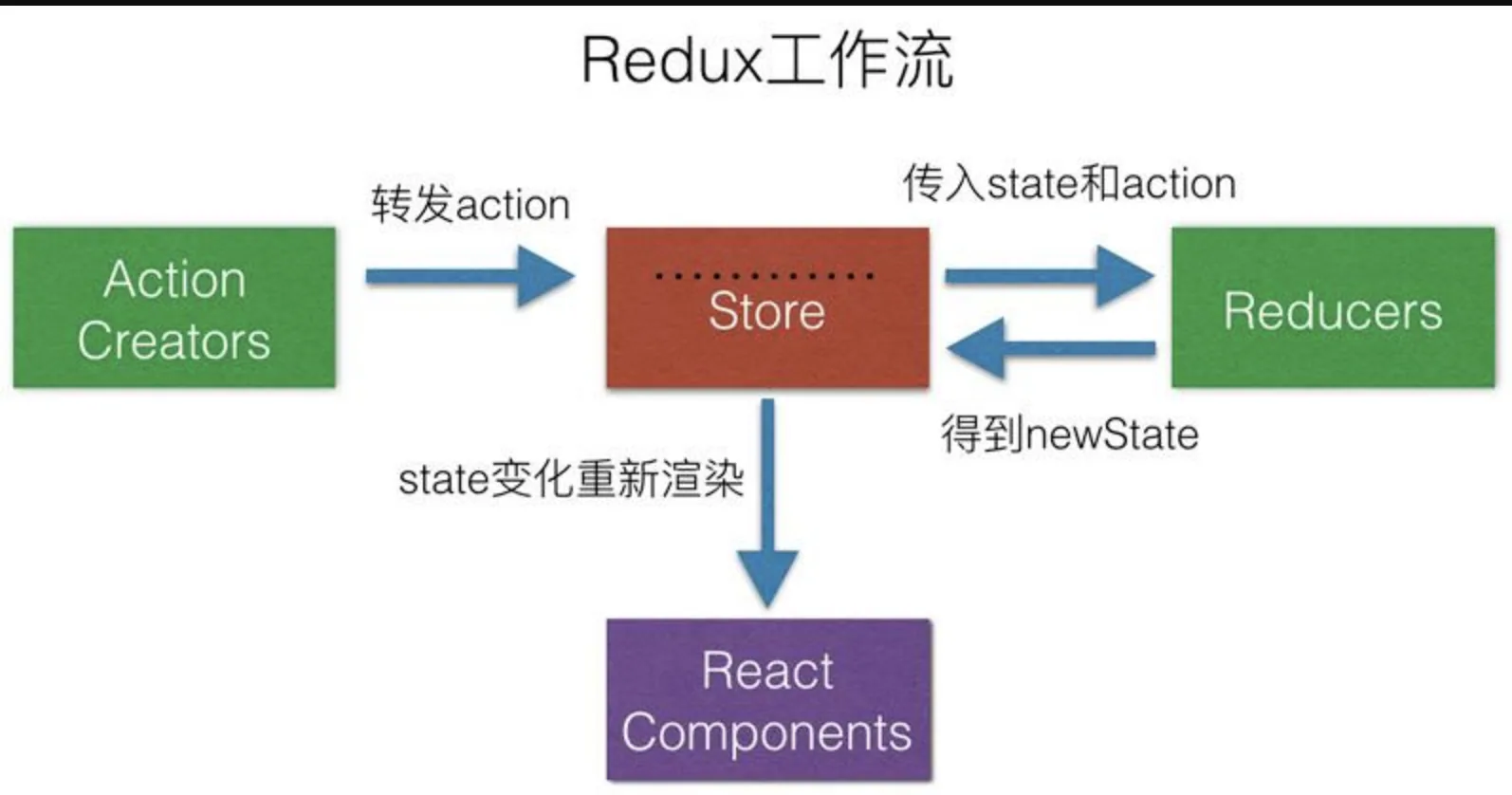
Redux三大原则
- 唯一数据源
整个应用的state都被存储到一个状态树里面,并且这个状态树,只存在于唯一的store中
- 保持只读状态
state是只读的,唯一改变state的方法就是触发action,action是一个用于描述以发生时间的普通对象
- 数据改变只能通过纯函数来执行
使用纯函数来执行修改,为了描述
action如何改变state的,你需要编写reducers
Redux源码
    let createStore = (reducer) => {
        let state;
        //获取状态对象
        //存放所有的监听函数
        let listeners = [];
        let getState = () => state;
        //提供一个方法供外部调用派发action
        let dispath = (action) => {
            //调用管理员reducer得到新的state
            state = reducer(state, action);
            //执行所有的监听函数
            listeners.forEach((l) => l())
        }
        //订阅状态变化事件,当状态改变发生之后执行监听函数
        let subscribe = (listener) => {
            listeners.push(listener);
        }
        dispath();
        return {
            getState,
            dispath,
            subscribe
        }
    }
    let combineReducers=(renducers)=>{
        //传入一个renducers管理组,返回的是一个renducer
        return function(state={},action={}){
            let newState={};
            for(var attr in renducers){
                newState[attr]=renducers[attr](state[attr],action)

            }
            return newState;
        }
    }
    export {createStore,combineReducers};
Redux怎么实现dispstch一个函数
以
redux-thunk中间件作为例子,下面就是thunkMiddleware函数的代码
    // 部分转为ES5代码,运行middleware函数会返回一个新的函数,如下:
    return ({ dispatch, getState }) => {
        // next实际就是传入的dispatch
        return function (next) {
            return function (action) {
                // redux-thunk核心
                if (typeof action === 'function') {
                    return action(dispatch, getState, extraArgument);
                }
                return next(action);
            };
        };
    }
redux-thunk库内部源码非常的简单,允许action是一个函数,同时支持参数传递,否则调用方法不变
redux创建Store:通过combineReducers函数合并reducer函数,返回一个新的函数combination(这个函数负责循环遍历运行reducer函数,返回全部state)。将这个新函数作为参数传入createStore函数,函数内部通过dispatch,初始化运行传入的combination,state生成,返回store对象redux中间件:applyMiddleware函数中间件的主要目的就是修改dispatch函数,返回经过中间件处理的新的dispatch函数redux使用:实际就是再次调用循环遍历调用reducer函数,更新state
connect高级组件原理
- 首先
connect之所以会成功,是因为Provider组件: - 在原应用组件上包裹一层,使原来整个应用成为
Provider的子组件 接收Redux的store作为props,通过context对象传递给子孙组件上的connect
connect做了些什么。它真正连接Redux和React,它包在我们的容器组件的外一层,它接收上面Provider提供的store里面的state和dispatch,传给一个构造函数,返回一个对象,以属性形式传给我们的容器组件
connect是一个高阶函数,首先传入mapStateToProps、mapDispatchToProps,然后返回一个生产Component的函数(wrapWithConnect),然后再将真正的Component作为参数传入wrapWithConnect,这样就生产出一个经过包裹的Connect组件,
该组件具有如下特点
- 通过
props.store获取祖先Component的store props包括stateProps、dispatchProps、parentProps,合并在一起得到nextState,作为props传给真正的Component componentDidMount时,添加事件this.store.subscribe(this.handleChange),实现页面交互 shouldComponentUpdate时判断是否有避免进行渲染,提升页面性能,并得到nextStatecomponentWillUnmount时移除注册的事件this.handleChange
由于
connect的源码过长,我们只看主要逻辑
    export default function connect(mapStateToProps, mapDispatchToProps, mergeProps, options = {}) {
      return function wrapWithConnect(WrappedComponent) {
        class Connect extends Component {
          constructor(props, context) {
            // 从祖先Component处获得store
            this.store = props.store || context.store
            this.stateProps = computeStateProps(this.store, props)
            this.dispatchProps = computeDispatchProps(this.store, props)
            this.state = { storeState: null }
            // 对stateProps、dispatchProps、parentProps进行合并
            this.updateState()
          }
          shouldComponentUpdate(nextProps, nextState) {
            // 进行判断,当数据发生改变时,Component重新渲染
            if (propsChanged || mapStateProducedChange || dispatchPropsChanged) {
              this.updateState(nextProps)
              return true
            }
            componentDidMount() {
              // 改变Component的state
              this.store.subscribe(() = {
                this.setState({
                  storeState: this.store.getState()
                })
              })
            }
            render() {
              // 生成包裹组件Connect
              return (
                <WrappedComponent {...this.nextState} />
              )
            }
          }
          Connect.contextTypes = {
            store: storeShape
          }
          return Connect;
        }
      }
Dva工作原理
集成
redux+redux-saga
工作原理
改变发生通常是通过用户交互行为或者浏览器行为(如路由跳转等)触发的,当此类行为会改变数据的时候可以通过
dispatch发起一个action,如果是同步行为会直接通过Reducers改变State,如果是异步行为(副作用)会先触发Effects然后流向Reducers最终改变State