
7 组件生命周期
[点击查看各个版本的生命周期 (opens new window)](https://projects.wojtekmaj.pl/react- lifecycle-methods-diagram/)
> =16.4
react旧版生命周期函数
初始化阶段
getDefaultProps:获取实例的默认属性getInitialState:获取每个实例的初始化状态componentWillMount:组件即将被装载、渲染到页面上render:组件在这里生成虚拟的DOM节点componentDidMount:组件真正在被装载之后
运行中状态
componentWillReceiveProps:组件将要接收到属性的时候调用- 新版本已被废弃,设置为不安全的生命周期函数
UNSAFE_componentWillReceiveProps - 当
props改变的时候才调用,子组件第二次接收到props的时候
- 新版本已被废弃,设置为不安全的生命周期函数
shouldComponentUpdate:组件接受到新属性或者新状态的时候(可以返回false,接收数据后不更新,阻止render调用,后面的函数不会被继续执行了)componentWillUpdate:组件即将更新不能修改属性和状态render:组件重新描绘componentDidUpdate:组件已经更新
销毁阶段
componentWillUnmount:组件即将销毁
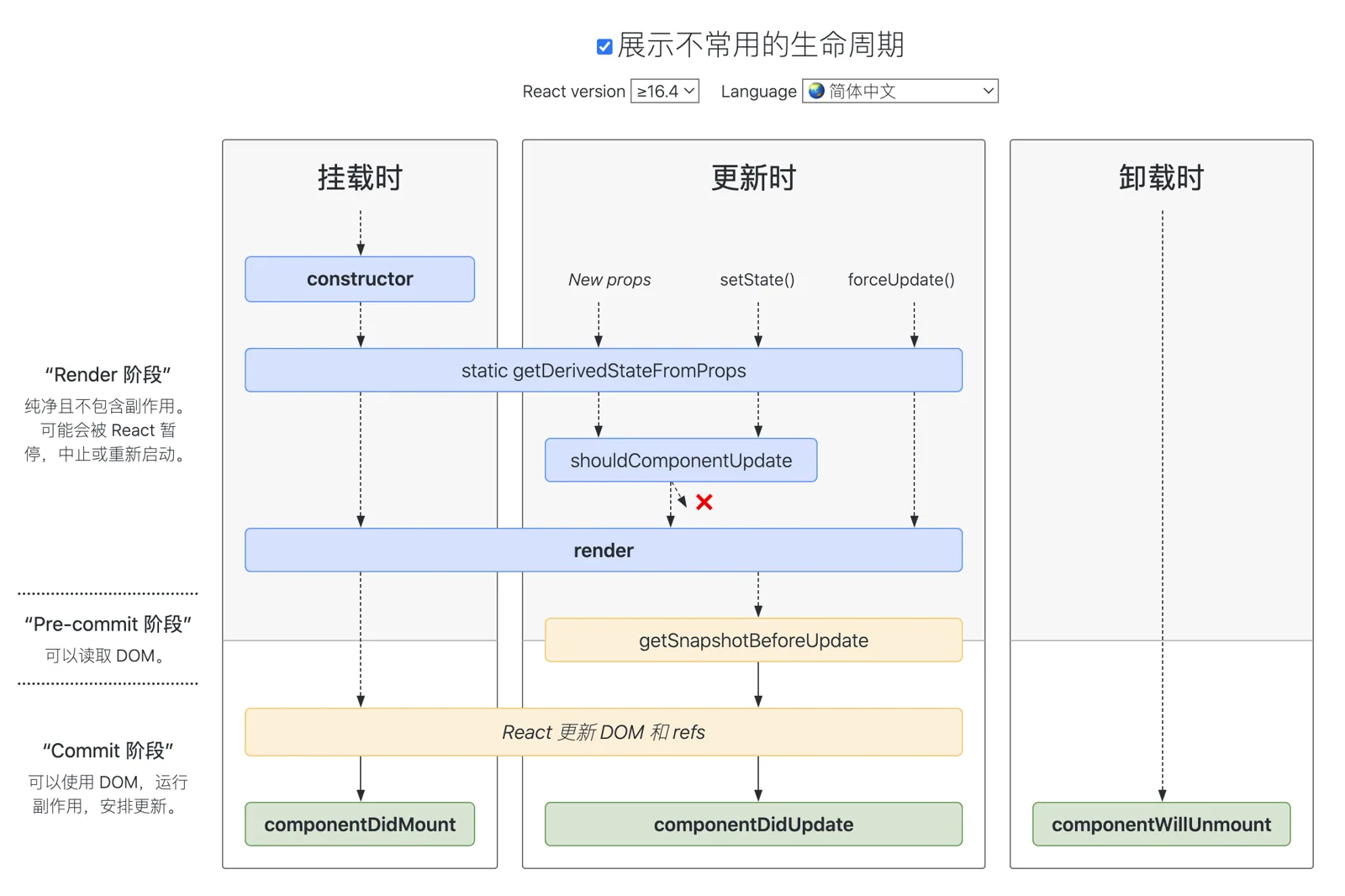
新版生命周期
在新版本中,
React官方对生命周期有了新的 变动建议:
- 使用
getDerivedStateFromProps替换componentWillMount; - 使用
getSnapshotBeforeUpdate替换componentWillUpdate; - 避免使用
componentWillReceiveProps;
其实该变动的原因,正是由于上述提到的
Fiber。首先,从上面我们知道React可以分成reconciliation与commit两个阶段,对应的生命周期如下:
reconciliation
componentWillMountcomponentWillReceivePropsshouldComponentUpdatecomponentWillUpdate
commit
componentDidMountcomponentDidUpdatecomponentWillUnmount
在
Fiber中,reconciliation阶段进行了任务分割,涉及到 暂停 和 重启,因此可能会导致reconciliation中的生命周期函数在一次更新渲染循环中被 多次调用 的情况,产生一些意外错误
新版的建议生命周期如下:
    class Component extends React.Component {
      // 替换 `componentWillReceiveProps` ,
      // 初始化和 update 时被调用
      // 静态函数,无法使用 this
      static getDerivedStateFromProps(nextProps, prevState) {}

      // 判断是否需要更新组件
      // 可以用于组件性能优化
      shouldComponentUpdate(nextProps, nextState) {}

      // 组件被挂载后触发
      componentDidMount() {}

      // 替换 componentWillUpdate
      // 可以在更新之前获取最新 dom 数据
      getSnapshotBeforeUpdate() {}

      // 组件更新后调用
      componentDidUpdate() {}

      // 组件即将销毁
      componentWillUnmount() {}

      // 组件已销毁
      componentDidUnMount() {}
    }
使用建议:
- 在
constructor初始化state; - 在
componentDidMount中进行事件监听,并在componentWillUnmount中解绑事件; - 在
componentDidMount中进行数据的请求,而不是在componentWillMount; - 需要根据
props更新state时,使用getDerivedStateFromProps(nextProps, prevState);- 旧
props需要自己存储,以便比较;
- 旧
react中这两个生命周期会触发死循环
componentWillUpdate生命周期在shouldComponentUpdate返回true后被触发。在这两个生命周期只要视图更新就会触发,因此不能再这两个生命周期中使用setState否则会导致死循环
    public static getDerivedStateFromProps(nextProps, prevState) {
    	// 当新 props 中的 data 发生变化时,同步更新到 state 上
    	if (nextProps.data !== prevState.data) {
    		return {
    			data: nextProps.data
    		}
    	} else {
    		return null1
    	}
    }
可以在
componentDidUpdate监听props或者state的变化,例如:
    componentDidUpdate(prevProps) {
    	// 当 id 发生变化时,重新获取数据
    	if (this.props.id !== prevProps.id) {
    		this.fetchData(this.props.id);
    	}
    }
- 在
componentDidUpdate使用setState时,必须加条件,否则将进入死循环; getSnapshotBeforeUpdate(prevProps, prevState)可以在更新之前获取最新的渲染数据,它的调用是在render之后,update之前;shouldComponentUpdate: 默认每次调用setState,一定会最终走到diff阶段,但可以通过shouldComponentUpdate的生命钩子返回false来直接阻止后面的逻辑执行,通常是用于做条件渲染,优化渲染的性能。
为什么有些react生命周期钩子被标记为UNSAFE
componentWillMount
componentWillMount生命周期发生在首次渲染前,一般使用的小伙伴大多在这里初始化数据或异步获取外部数据赋值。初始化数据,react官方建议放在constructor里面。而异步获取外部数据,渲染并不会等待数据返回后再去渲染
    class Example extends React.Component {
        state = {
            value: ''
        };
        componentWillMount() {
            this.setState({
                value: this.props.source.value
            });
            this.props.source.subscribe(this.handleChange);
        }
        componentWillUnmount() {
            this.props.source.unsubscribe(this.handleChange );
        }
        handleChange = source => {
            this.setState({
                value: source.value
            });
        };
    }
试想一下,假如组件在第一次渲染的时候被中断,由于组件没有完成渲染,所以并不会执行
componentWillUnmount生命周期(注:很多人经常认为componentWillMount和componentWillUnmount总是配对,但这并不是一定的。只有调用componentDidMount后,React才能保证稍后调用componentWillUnmount进行清理)。因此handleSubscriptionChange还是会在数据返回成功后被执行,这时候setState由于组件已经被移除,就会导致内存泄漏。所以建议把异步获取外部数据写在componentDidMount生命周期里,这样就能保证componentWillUnmount生命周期会在组件移除的时候被执行,避免内存泄漏的风险。
componentWillReceiveProps
componentWillReceiveProps生命周期是在props更新时触发。一般用于props参数更新时同步更新state参数。但如果在componentWillReceiveProps生命周期直接调用父组件的某些有调用setState的函数,会导致程序死循环
    // 如下是子组件componentWillReceiveProps里调用父组件改变state的函数示例

    class Parent extends React.Component{
        constructor(){
            super();
            this.state={
                list: [],
                selectedData: {}
            };
        }

        changeSelectData = selectedData => {
            this.setState({
                selectedData
            });
        }

        render(){
            return (
                <Clild list={this.state.list} changeSelectData={this.changeSelectData}/>
            );
        }
    }

    ...
    class Child extends React.Component{
        constructor(){
            super();
            this.state={
                list: []
            };
        }
        componentWillReceiveProps(nextProps){
            this.setState({
                list: nextProps.list
            })
            nextProps.changeSelectData(nextProps.list[0]); //默认选择第一个
        }
        ...
    }
- 如上代码,在
Child组件的componentWillReceiveProps里直接调用Parent组件的changeSelectData去更新Parent组件state的selectedData值。会触发Parent组件重新渲染,而Parent组件重新渲染会触发Child组件的componentWillReceiveProps生命周期函数执行。如此就会陷入死循环。导致程序崩溃。 - 所以,
React官方把componentWillReceiveProps替换为UNSAFE_componentWillReceiveProps,在使用这个生命周期的时候注意它会有缺陷,要注意避免,比如上面例子,Child在componentWillReceiveProps调用changeSelectData时先判断list是否有更新再确定是否要调用,就可以避免死循环。
componentWillUpdate
componentWillUpdate生命周期在视图更新前触发。一般用于视图更新前保存一些数据方便视图更新完成后赋值
    // 如下是列表加载更新后回到当前滚动条位置的案例
    class ScrollingList extends React.Component {
        listRef = null;
        previousScrollOffset = null;
        componentWillUpdate(nextProps, nextState) {
            if (this.props.list.length < nextProps.list.length) {
                this.previousScrollOffset = this.listRef.scrollHeight - this.listRef.scrollTop;
            }
        }
        componentDidUpdate(prevProps, prevState) {
            if (this.previousScrollOffset !== null) {
                this.listRef.scrollTop = this.listRef.scrollHeight - this.previousScrollOffset;
                this.previousScrollOffset = null;
            }
        }
        render() {
            return (
                `<div>` {/* ...contents... */}`</div>`
            );
        }
        setListRef = ref => {    this.listRef = ref;   };
- 由于
componentWillUpdate和componentDidUpdate这两个生命周期函数有一定的时间差(componentWillUpdate后经过渲染、计算、再更新DOM元素,最后才调用componentDidUpdate),如果这个时间段内用户刚好拉伸了浏览器高度,那componentWillUpdate计算的previousScrollOffset就不准确了。如果在componentWillUpdate进行setState操作,会出现多次调用只更新一次的问题,把setState放在componentDidUpdate,能保证每次更新只调用一次。 - 所以,
react官方建议把componentWillUpdate替换为UNSAFE_componentWillUpdate。如果真的有以上案例的需求,可以使用16.3新加入的一个周期函数getSnapshotBeforeUpdate
结论
React意识到componentWillMount、componentWillReceiveProps和componentWillUpdate这三个生命周期函数有缺陷,比较容易导致崩溃。但是由于旧的项目已经在用以及有些老开发者习惯用这些生命周期函数,于是通过给它加UNSAFE_来提醒用它的人要注意它们的缺陷React加入了两个新的生命周期函数getSnapshotBeforeUpdate和getDerivedStateFromProps,目的为了即使不使用这三个生命周期函数,也能实现只有这三个生命周期能实现的功能
在生命周期中的哪一步你应该发起 AJAX 请求
我们应当将AJAX 请求放到
componentDidMount函数中执行,主要原因有下
React下一代调和算法Fiber会通过开始或停止渲染的方式优化应用性能,其会影响到componentWillMount的触发次数。对于componentWillMount这个生命周期函数的调用次数会变得不确定,React可能会多次频繁调用componentWillMount。如果我们将AJAX请求放到componentWillMount函数中,那么显而易见其会被触发多次,自然也就不是好的选择。- 如果我们将
AJAX请求放置在生命周期的其他函数中,我们并不能保证请求仅在组件挂载完毕后才会要求响应。如果我们的数据请求在组件挂载之前就完成,并且调用了setState函数将数据添加到组件状态中,对于未挂载的组件则会报错。而在componentDidMount函数中进行AJAX请求则能有效避免这个问题