
23 v-model双向绑定原理
v-model实现原理
我们在
vue项目中主要使用v-model指令在表单input、textarea、select等元素上创建双向数据绑定,我们知道v-model本质上不过是语法糖(可以看成是value + input方法的语法糖),v-model在内部为不同的输入元素使用不同的属性并抛出不同的事件:
text和textarea元素使用value属性和input事件checkbox和radio使用checked属性和change事件select字段将value作为prop并将change作为事件
所以我们可以v-model进行如下改写:
    <input v-model="sth" />
    <!-- 等同于 -->
    <input :value="sth" @input="sth = $event.target.value" />
当在
input元素中使用v-model实现双数据绑定,其实就是在输入的时候触发元素的input事件,通过这个语法糖,实现了数据的双向绑定
- 这个语法糖必须是固定的,也就是说属性必须为
value,方法名必须为:input。 - 知道了
v-model的原理,我们可以在自定义组件上实现v-model
    //Parent
    <template>
      {{num}}
      <Child v-model="num">
    </template>
    export default {
      data(){
        return {
          num: 0
        }
      }
    }

    //Child
    <template>
      <div @click="add">Add</div>
    </template>
    export default {
      props: ['value'], // 属性必须为value
      methods:{
        add(){
          // 方法名为input
          this.$emit('input', this.value + 1)
        }
      }
    }
原理
会将组件的 v-model 默认转化成value+input
    const VueTemplateCompiler = require('vue-template-compiler');
    const ele = VueTemplateCompiler.compile('<el-checkbox v-model="check"></el- checkbox>');

    // 观察输出的渲染函数:
    // with(this) {
    //     return _c('el-checkbox', {
    //         model: {
    //             value: (check),
    //             callback: function ($$v) { check = $$v },
    //             expression: "check"
    //         }
    //     })
    // }
    // 源码位置 core/vdom/create-component.js line:155

    function transformModel (options, data: any) {
        const prop = (options.model && options.model.prop) || 'value'
        const event = (options.model && options.model.event) || 'input'
        ;(data.attrs || (data.attrs = {}))[prop] = data.model.value
        const on = data.on || (data.on = {})
        const existing = on[event]
        const callback = data.model.callback
        if (isDef(existing)) {
            if (Array.isArray(existing) ? existing.indexOf(callback) === -1 : existing !== callback ) {
                on[event] = [callback].concat(existing)
            }
        } else {
            on[event] = callback
        }
    }
原生的 v-model,会根据标签的不同生成不同的事件和属性
    const VueTemplateCompiler = require('vue-template-compiler');
    const ele = VueTemplateCompiler.compile('<input v-model="value"/>');

    // with(this) {
    //     return _c('input', {
    //         directives: [{ name: "model", rawName: "v-model", value: (value), expression: "value" }],
    //         domProps: { "value": (value) },
    //         on: {"input": function ($event) {
    //             if ($event.target.composing) return;
    //             value = $event.target.value
    //         }
    //         }
    //     })
    // }
编译时:不同的标签解析出的内容不一样
platforms/web/compiler/directives/model.js
    if (el.component) {
        genComponentModel(el, value, modifiers) // component v-model doesn't need extra runtime
        return false
    } else if (tag === 'select') {
        genSelect(el, value, modifiers)
    } else if (tag === 'input' && type === 'checkbox') {
        genCheckboxModel(el, value, modifiers)
    } else if (tag === 'input' && type === 'radio') {
        genRadioModel(el, value, modifiers)
    } else if (tag === 'input' || tag === 'textarea') {
        genDefaultModel(el, value, modifiers)
    } else if (!config.isReservedTag(tag)) {
        genComponentModel(el, value, modifiers) // component v-model doesn't need extra runtime
        return false
    }
运行时:会对元素处理一些关于输入法的问题
platforms/web/runtime/directives/model.js
    inserted (el, binding, vnode, oldVnode) {
        if (vnode.tag === 'select') { // #6903
        if (oldVnode.elm && !oldVnode.elm._vOptions) {
            mergeVNodeHook(vnode, 'postpatch', () => {
                directive.componentUpdated(el, binding, vnode)
            })
        } else {
            setSelected(el, binding, vnode.context)
        }
        el._vOptions = [].map.call(el.options, getValue)
        } else if (vnode.tag === 'textarea' || isTextInputType(el.type)) {
            el._vModifiers = binding.modifiers
            if (!binding.modifiers.lazy) {
                el.addEventListener('compositionstart', onCompositionStart)
                el.addEventListener('compositionend', onCompositionEnd)
                // Safari < 10.2 & UIWebView doesn't fire compositionend when
                // switching focus before confirming composition choice
                // this also fixes the issue where some browsers e.g. iOS Chrome
                // fires "change" instead of "input" on autocomplete.
                el.addEventListener('change', onCompositionEnd) /* istanbul ignore if */
                if (isIE9) {
                    el.vmodel = true
                }
            }
        }
    }
Vue中修饰符.sync与v-model的区别
sync的作用
.sync修饰符可以实现父子组件之间的双向绑定,并且可以实现子组件同步修改父组件的值,相比较与v-model来说,sync修饰符就简单很多了- 一个组件上可以有多个
.sync修饰符
    <!-- 正常父传子 -->
    <Son :a="num" :b="num2" />

    <!-- 加上sync之后的父传子 -->
    <Son :a.sync="num" :b.sync="num2" />

    <!-- 它等价于 -->
    <Son
      :a="num"
      :b="num2"
      @update:a="val=>num=val"
      @update:b="val=>num2=val"
    />

    <!-- 相当于多了一个事件监听,事件名是update:a, -->
    <!-- 回调函数中,会把接收到的值赋值给属性绑定的数据项中。 -->
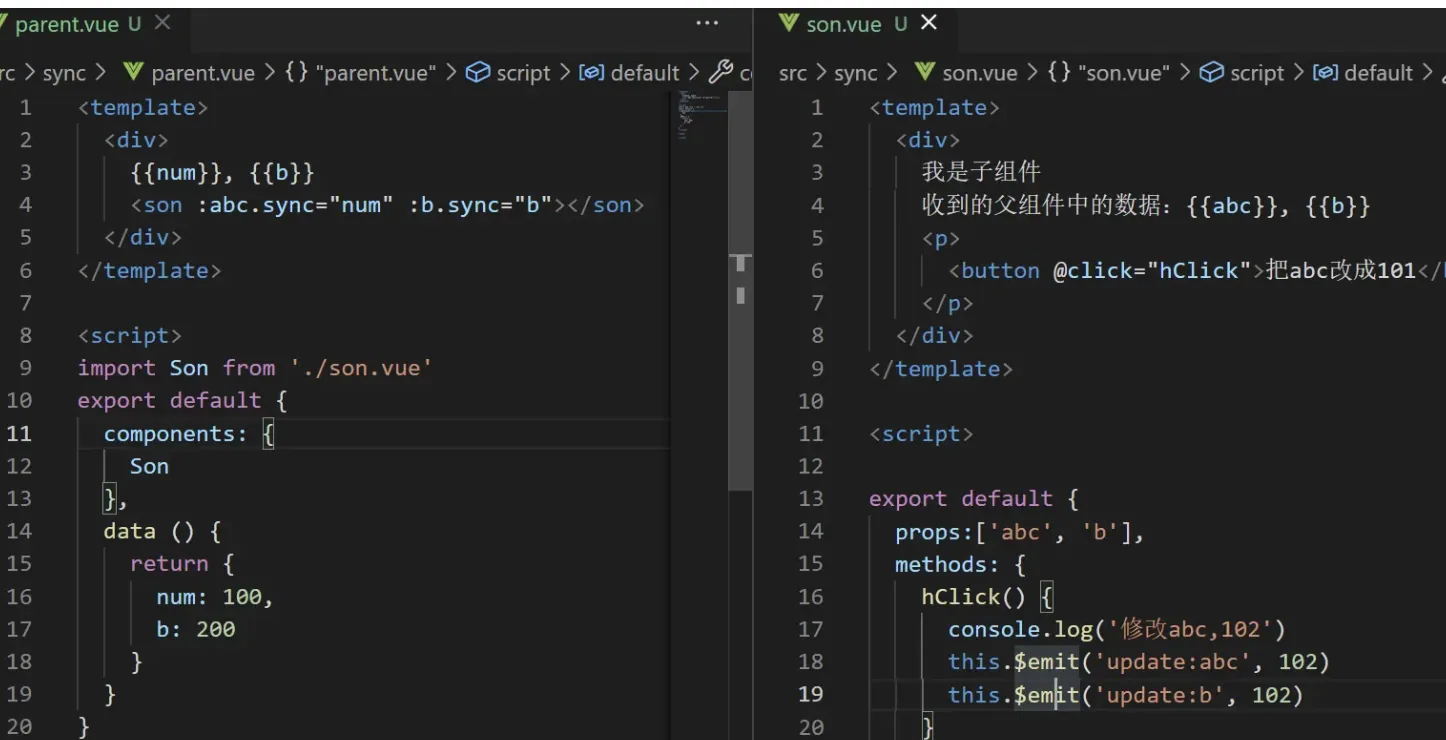
v-model的工作原理
    <com1 v-model="num"></com1>
    <!-- 等价于 -->
    <com1 :value="num" @input="(val)=>num=val"></com1>
- 相同点
- 都是语法糖,都可以实现父子组件中的数据的双向通信
- 区别点
- 格式不同:
v-model="num",:num.sync="num" v-model:@input + value:num.sync:@update:numv-model只能用一次;.sync可以有多个
- 格式不同:
补充(现代做法):上文是 Vue2 的实现。在 Vue3 中:(1) 自定义组件
v-model默认 prop 由value改为modelValue、事件由input改为update:modelValue;(2) 支持 多个v-model带参数,如<Child v-model:title="t" v-model:content="c" />,因此 Vue2 的.sync修饰符被移除,其能力被「带参数的v-model」替代;(3) 在<script setup>中可用编译宏defineModel()直接拿到可读写的双向绑定 ref,无需手写props+emit('update:modelValue');(4)v-model修饰符可通过defineModel('title', { ... })或第三个参数自定义处理。