
7 React Hooks
class组件存在哪些问题
- 函数组件的特点
- 没有组件实例
- 没有生命周期
- 没有
state和setState,只能接收props
- class组件问题
- 大型组件很难拆分和重构,很难测试
- 相同的业务逻辑分散到各个方法中,逻辑混乱
- 复用逻辑变得复杂,如
Mixins、HOC、Render Props
- react组件更易用函数表达
- React提倡函数式编程,
View = fn(props) - 函数更灵活,更易于拆分,更易测试
- 但函数组件太简单,需要增强能力—— 使用
hooks
- React提倡函数式编程,
用useState实现state和setState功能
让函数组件实现state和setState
- 默认函数组件没有
state - 函数组件是一个纯函数,执行完即销毁,无法存储
state - 需要
state hook,即把state“钩”到纯函数中(保存到闭包中)
hooks命名规范
- 规定所有的
hooks都要以use开头,如useXX - 自定义
hook也要以use开头
    // 使用hooks
    import React, { useState } from 'react'

    function ClickCounter() {
        // 数组的解构
        // useState 就是一个 Hook “钩”,最基本的一个 Hook
        const [count, setCount] = useState(0) // 传入一个初始值

        const [name, setName] = useState('test')

        // const arr = useState(0)
        // const count = arr[0]
        // const setCount = arr[1]

        function clickHandler() {
            setCount(count + 1)
            setName(name + '2020')
        }

        return <div>
            <p>你点击了 {count} 次 {name}</p>
            <button onClick={clickHandler}>点击</button>
        </div>
    }

    export default ClickCounter
    // 使用class

    import React from 'react'

    class ClickCounter extends React.Component {
        constructor() {
            super()

            // 定义 state
            this.state = {
                count: 0,
                name: 'test'
            }
        }
        render() {
            return <div>
                <p>你点击了 {this.state.count} 次 {this.state.name}</p>
                <button onClick={this.clickHandler}>点击</button>
            </div>
        }
        clickHandler = ()=> {
            // 修改 state
            this.setState({
                count: this.state.count + 1,
                name: this.state.name + '2020'
            })
        }
    }

    export default ClickCounter
用useEffect模拟组件生命周期
让函数组件模拟生命周期
- 默认函数组件没有生命周期
- 函数组件是一个纯函数,执行完即销毁,自己无法实现生命周期
- 使用
Effect Hook把生命周期"钩"到纯函数中
useEffect让纯函数有了副作用
- 默认情况下,执行纯函数,输入参数,返回结果,无副作用
- 所谓副作用,就是对函数之外造成影响,如设置全局定时器
- 而组件需要副作用,所以需要有
useEffect钩到纯函数中
总结
- 模拟
componentDidMount,useEffect依赖[] - 模拟
componentDidUpdate,useEffect依赖[a,b]或者useEffect(fn)没有写第二个参数 - 模拟
componentWillUnmount,useEffect返回一个函数 - 注意
useEffect(fn)没有写第二个参数:同时模拟componentDidMount+componentDidUpdate
    import React, { useState, useEffect } from 'react'

    function LifeCycles() {
        const [count, setCount] = useState(0)
        const [name, setName] = useState('test')

        // // 模拟 class 组件的 DidMount 和 DidUpdate
        // useEffect(() => {
        //     console.log('在此发送一个 ajax 请求')
        // })

        // // 模拟 class 组件的 DidMount
        // useEffect(() => {
        //     console.log('加载完了')
        // }, []) // 第二个参数是 [] (不依赖于任何 state)

        // // 模拟 class 组件的 DidUpdate
        // useEffect(() => {
        //     console.log('更新了')
        // }, [count, name]) // 第二个参数就是依赖的 state

        // 模拟 class 组件的 DidMount
        useEffect(() => {
            let timerId = window.setInterval(() => {
                console.log(Date.now())
            }, 1000)

            // 返回一个函数
            // 模拟 WillUnMount
            return () => {
                window.clearInterval(timerId)
            }
        }, [])

        function clickHandler() {
            setCount(count + 1)
            setName(name + '2020')
        }

        return <div>
            <p>你点击了 {count} 次 {name}</p>
            <button onClick={clickHandler}>点击</button>
        </div>
    }

    export default LifeCycles
用useEffect模拟WillUnMount时的注意事项
useEffect中返回函数
useEffect依赖项[],组件销毁时执行fn,等于willUnmountuseEffect第二个参数没有或依赖项[a,b],组件更新时执行fn,即下次执行useEffect之前,就会执行fn,无论更新或卸载(props更新会导致willUnmount多次执行)
    import React from 'react'

    class FriendStatus extends React.Component {
        constructor(props) {
            super(props)
            this.state = {
                status: false // 默认当前不在线
            }
        }
        render() {
            return <div>
                好友 {this.props.friendId} 在线状态:{this.state.status}
            </div>
        }
        componentDidMount() {
            console.log(`开始监听 ${this.props.friendId} 的在线状态`)
        }
        componentWillUnMount() {
            console.log(`结束监听 ${this.props.friendId} 的在线状态`)
        }
        // friendId 更新
        componentDidUpdate(prevProps) {
            console.log(`结束监听 ${prevProps.friendId} 在线状态`)
            console.log(`开始监听 ${this.props.friendId} 在线状态`)
        }
    }

    export default FriendStatus
    import React, { useState, useEffect } from 'react'

    function FriendStatus({ friendId }) {
        const [status, setStatus] = useState(false)

        // DidMount 和 DidUpdate
        useEffect(() => {
            console.log(`开始监听 ${friendId} 在线状态`)

            // 【特别注意】
            // 此处并不完全等同于 WillUnMount
            // props 发生变化,即更新,也会执行结束监听
            // 准确的说:返回的函数,会在下一次 effect 执行之前,被执行
            return () => {
                console.log(`结束监听 ${friendId} 在线状态`)
            }
        })

        return <div>
            好友 {friendId} 在线状态:{status.toString()}
        </div>
    }

    export default FriendStatus
useRef和useContext
1. useRef
    import React, { useRef, useEffect } from 'react'

    function UseRef() {
        const btnRef = useRef(null) // 初始值

        // const numRef = useRef(0)
        // numRef.current

        useEffect(() => {
            console.log(btnRef.current) // DOM 节点
        }, [])

        return <div>
            <button ref={btnRef}>click</button>
        </div>
    }

    export default UseRef
2. useContext
    import React, { useContext } from 'react'

    // 主题颜色
    const themes = {
        light: {
            foreground: '#000',
            background: '#eee'
        },
        dark: {
            foreground: '#fff',
            background: '#222'
        }
    }

    // 创建 Context
    const ThemeContext = React.createContext(themes.light) // 初始值

    function ThemeButton() {
        const theme = useContext(ThemeContext)

        return <button style={{ background: theme.background, color: theme.foreground }}>
            hello world
        </button>
    }

    function Toolbar() {
        return <div>
            <ThemeButton></ThemeButton>
        </div>
    }

    function App() {
        return <ThemeContext.Provider value={themes.dark}>
            <Toolbar></Toolbar>
        </ThemeContext.Provider>
    }

    export default App
useReducer能代替redux吗
useReducer是useState的代替方案,用于state复杂变化useReducer是单个组件状态管理,组件通讯还需要propsredux是全局的状态管理,多组件共享数据
    import React, { useReducer } from 'react'

    const initialState = { count: 0 }

    const reducer = (state, action) => {
        switch (action.type) {
            case 'increment':
                return { count: state.count + 1 }
            case 'decrement':
                return { count: state.count - 1 }
            default:
                return state
        }
    }

    function App() {
        // 很像 const [count, setCount] = useState(0)
        const [state, dispatch] = useReducer(reducer, initialState)

        return <div>
            count: {state.count}
            <button onClick={() => dispatch({ type: 'increment' })}>increment</button>
            <button onClick={() => dispatch({ type: 'decrement' })}>decrement</button>
        </div>
    }

    export default App
使用useMemo做性能优化
- 状态变化,React会默认更新所有子组件
class组件使用shouldComponentUpdate和PureComponent优化Hooks中使用useMemo缓存对象,避免子组件更新useMemo需要配合React.memo使用才生效
    import React, { useState, memo, useMemo } from 'react'

    // 子组件
    // function Child({ userInfo }) {
    //     console.log('Child render...', userInfo)

    //     return <div>
    //         <p>This is Child {userInfo.name} {userInfo.age}</p>
    //     </div>
    // }
    // 类似 class PureComponent ,对 props 进行浅层比较
    const Child = memo(({ userInfo }) => {
        console.log('Child render...', userInfo)

        return <div>
            <p>This is Child {userInfo.name} {userInfo.age}</p>
        </div>
    })

    // 父组件
    function App() {
        console.log('Parent render...')

        const [count, setCount] = useState(0)
        const [name, setName] = useState('test')

        // const userInfo = { name, age: 20 }
        // 用 useMemo 缓存数据,有依赖
        // useMemo包裹后返回的对象是同一个,没有创建新的对象地址,不会触发子组件的重新渲染
        const userInfo = useMemo(() => {
            return { name, age: 21 }
        }, [name])

        return <div>
            <p>
                count is {count}
                <button onClick={() => setCount(count + 1)}>click</button>
            </p>
            <Child userInfo={userInfo}></Child>
        </div>
    }

    export default App
使用useCallback做性能优化
Hooks中使用useCallback缓存函数,避免子组件更新useCallback需要配合React.memo使用才生效
    import React, { useState, memo, useMemo, useCallback } from 'react'

    // 子组件,memo 相当于 PureComponent
    const Child = memo(({ userInfo, onChange }) => {
        console.log('Child render...', userInfo)

        return <div>
            <p>This is Child {userInfo.name} {userInfo.age}</p>
            <input onChange={onChange}></input>
        </div>
    })

    // 父组件
    function App() {
        console.log('Parent render...')

        const [count, setCount] = useState(0)
        const [name, setName] = useState('test')

        // 用 useMemo 缓存数据
        const userInfo = useMemo(() => {
            return { name, age: 21 }
        }, [name])

        // function onChange(e) {
        //     console.log(e.target.value)
        // }
        // 用 useCallback 缓存函数,避免在组件多次渲染中多次创建函数导致引用地址不一致
        const onChange = useCallback(e => {
            console.log(e.target.value)
        }, [])

        return <div>
            <p>
                count is {count}
                <button onClick={() => setCount(count + 1)}>click</button>
            </p>
            <Child userInfo={userInfo} onChange={onChange}></Child>
        </div>
    }

    export default App
什么是自定义Hook
- 封装通用的功能
- 开发和使用第三方
Hooks - 自定义
Hooks带来无限的拓展性,解耦代码
    import { useState, useEffect } from 'react'
    import axios from 'axios'

    // 封装 axios 发送网络请求的自定义 Hook
    function useAxios(url) {
        const [loading, setLoading] = useState(false)
        const [data, setData] = useState()
        const [error, setError] = useState()

        useEffect(() => {
            // 利用 axios 发送网络请求
            setLoading(true)
            axios.get(url) // 发送一个 get 请求
                .then(res => setData(res))
                .catch(err => setError(err))
                .finally(() => setLoading(false))
        }, [url])

        return [loading, data, error]
    }

    export default useAxios

    // 第三方 Hook
    // https://nikgraf.github.io/react-hooks/
    // https://github.com/umijs/hooks
    import { useState, useEffect } from 'react'

    function useMousePosition() {
        const [x, setX] = useState(0)
        const [y, setY] = useState(0)

        useEffect(() => {
            function mouseMoveHandler(event) {
                setX(event.clientX)
                setY(event.clientY)
            }

            // 绑定事件
            document.body.addEventListener('mousemove', mouseMoveHandler)

            // 解绑事件
            return () => document.body.removeEventListener('mousemove', mouseMoveHandler)
        }, [])

        return [x, y]
    }

    export default useMousePosition
    // 使用
    function App() {
        const url = 'http://localhost:3000/'
        // 数组解构
        const [loading, data, error] = useAxios(url)

        if (loading) return <div>loading...</div>

        return error
            ? <div>{JSON.stringify(error)}</div>
            : <div>{JSON.stringify(data)}</div>

        // const [x, y] = useMousePosition()
        // return <div style={{ height: '500px', backgroundColor: '#ccc' }}>
        //     <p>鼠标位置 {x} {y}</p>
        // </div>
    }
使用Hooks的两条重要规则
- 只能用于函数组件和自定义
Hook中,其他地方不可以 - 只能用于顶层代码,不能在判断、循环中使用
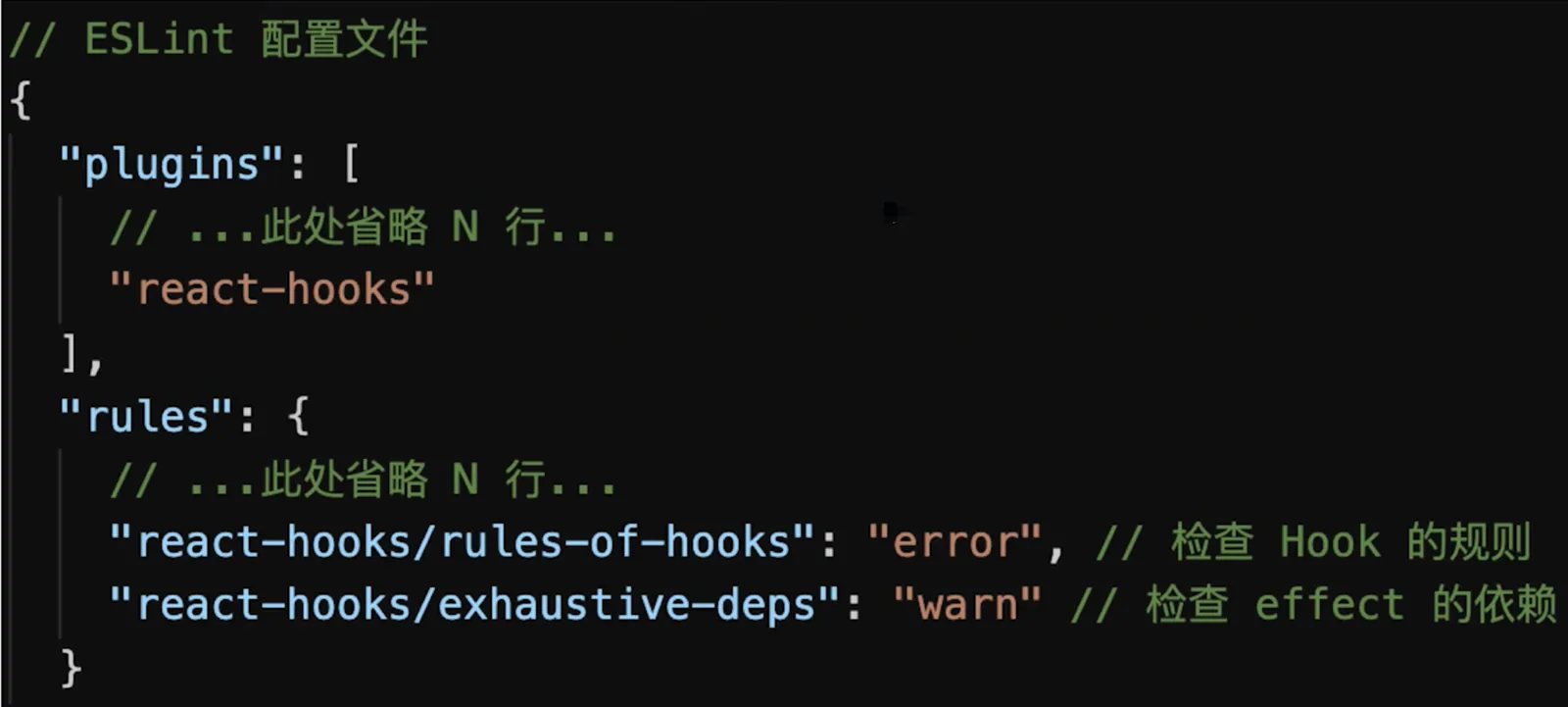
Hooks eslint插件eslint-plugin-react-hooks可以帮助检查Hooks的使用规则
为何Hooks要依赖于调用顺序
- 无论是
render还是re-render,Hooks调用顺序必须一致 - 如果
Hooks出现在循环、判断里,则无法保证顺序一致 Hooks严重依赖调用顺序
    import React, { useState, useEffect } from 'react'

    function Teach({ couseName }) {
        // 函数组件,纯函数,执行完即销毁
        // 所以,无论组件初始化(render)还是组件更新(re-render)
        // 都会重新执行一次这个函数,获取最新的组件
        // 这一点和 class 组件不一样:有组件实例,组件实例一旦声声明不会销毁(除非组件销毁)

        // render: 初始化 state 的值 '张三'
        // re-render: 读取 state 的值 '张三'
        const [studentName, setStudentName] = useState('张三')

        // if (couseName) {
        //     const [studentName, setStudentName] = useState('张三')
        // }

        // render: 初始化 state 的值 'poetry'
        // re-render: 读取 state 的值 'poetry'
        const [teacherName, setTeacherName] = useState('poetry')

        // if (couseName) {
        //     useEffect(() => {
        //         // 模拟学生签到
        //         localStorage.setItem('name', studentName)
        //     })
        // }

        // render: 添加 effect 函数
        // re-render: 替换 effect 函数(内部的函数也会重新定义)
        useEffect(() => { // 内部函数执行完就销毁
            // 模拟学生签到
            localStorage.setItem('name', studentName)
        })

        // render: 添加 effect 函数
        // re-render: 替换 effect 函数(内部的函数也会重新定义)
        useEffect(() => {// 内部函数执行完就销毁
            // 模拟开始上课
            console.log(`${teacherName} 开始上课,学生 ${studentName}`)
        })

        return <div>
            课程:{couseName},
            讲师:{teacherName},
            学生:{studentName}
        </div>
    }

    export default Teach
class组件逻辑复用有哪些问题
- 高级组件HOC
- 组件嵌套层级过多,不易于渲染、调试
HOC会劫持props,必须严格规范
- Render Props
- 学习成本高,不利于理解
- 只能传递纯函数,而默认情况下纯函数功能有限
Hooks组件逻辑复用有哪些好处
- 变量作用域很明确
- 不会产生组件嵌套
Hooks使用中的几个注意事项
useState初始化值,只有第一次有效useEffect内部不能修改state,第二个参数需要是空的依赖[]useEffect可能出现死循环,依赖[]里面有对象、数组等引用类型,把引用类型拆解为值类型
// 第一个坑:`useState`初始化值,只有第一次有效
import React, { useState } from 'react'
// 子组件
function Child({ userInfo }) {
// render: 初始化 state
// re-render: 只恢复初始化的 state 值,不会再重新设置新的值
// 只能用 setName 修改
const [ name, setName ] = useState(userInfo.name)
return <div>
<p>Child, props name: {userInfo.name}</p>
<p>Child, state name: {name}</p>
</div>
}
function App() {
const [name, setName] = useState('test')
const userInfo = { name }
return <div>
<div>
Parent
<button onClick={() => setName('test1')}>setName</button>
</div>
<Child userInfo={userInfo}/>
</div>
}
export default App
    // 第二个坑:`useEffect`内部不能修改`state`
    import React, { useState, useRef, useEffect } from 'react'

    function UseEffectChangeState() {
        const [count, setCount] = useState(0)

        // 模拟 DidMount
        const countRef = useRef(0)
        useEffect(() => {
            console.log('useEffect...', count)

            // 定时任务
            const timer = setInterval(() => {
                console.log('setInterval...', countRef.current) // 一直是0 闭包陷阱
                // setCount(count + 1)
                setCount(++countRef.current) // 解决方案使用useRef
            }, 1000)

            // 清除定时任务
            return () => clearTimeout(timer)
        }, []) // 依赖为 []

        // 依赖为 [] 时: re-render 不会重新执行 effect 函数
        // 没有依赖:re-render 会重新执行 effect 函数

        return <div>count: {count}</div>
    }

    export default UseEffectChangeState