
22 Vite了解吗
是一个基于浏览器原生
ES模块导入的开发服务器,在开发环境下,利用浏览器去解析import,在服务器端按需编译返回,完全跳过了打包这个概念,服务器随启随用。同时不仅对Vue文件提供了支持,还支持热更新,而且热更新的速度不会随着模块增多而变慢。在生产环境下使用Rollup打包
Vite 特点
Dev Server无需等待,即时启动;- 几乎实时的模块热更新;
- 所需文件按需编译,避免编译用不到的文件;
- 开箱即用,避免各种
Loader和Plugin的配置;
开箱即用
TypeScript- 内置支持less/sass/stylus/postcss- 内置支持(需要单独安装所对应的编译器)
生产环境需要打包吗
可以不打包,需要启动server,需要浏览器支持
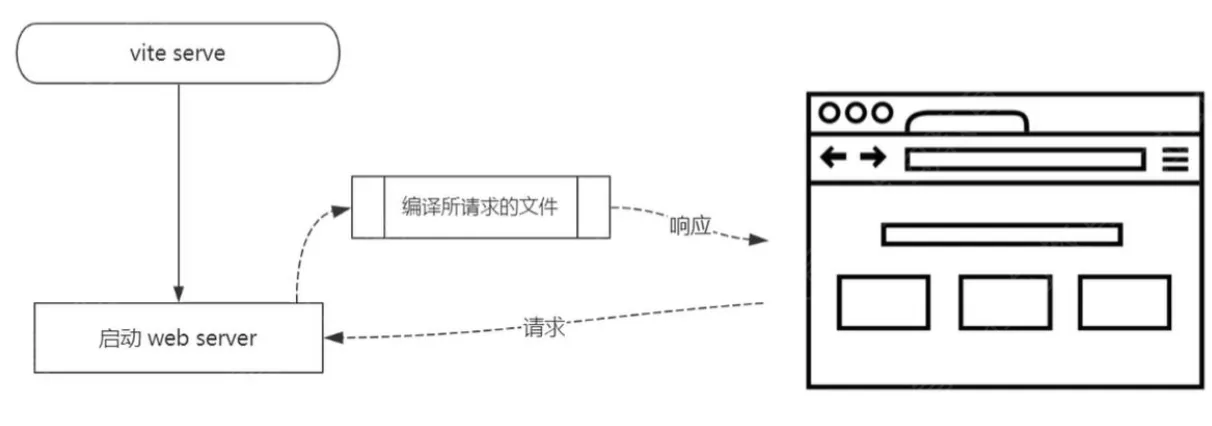
Vite 为什么启动非常快
- 开发环境使用
Es6 Module,无需打包,非常快 - 生产环境使用
rollup,并不会快很多
ES Module 在浏览器中的应用
    <p>基本演示</p>
    <script type="module">
        import add from './src/add.js'

        const res = add(1, 2)
        console.log('add res', res)
    </script>
    <script type="module">
        import { add, multi } from './src/math.js'
        console.log('add res', add(10, 20))
        console.log('multi res', multi(10, 20))
    </script>
    <p>外链引用</p>
    <script type="module" src="./src/index.js"></script>
    <p>远程引用</p>
    <script type="module">
        import { createStore } from 'https://unpkg.com/redux@latest/es/redux.mjs' // es module规范mjs
        console.log('createStore', createStore)
    </script>
    <p>动态引入</p>
    <button id="btn1">load1</button>
    <button id="btn2">load2</button>

    <script type="module">
        document.getElementById('btn1').addEventListener('click', async () => {
            const add = await import('./src/add.js')
            const res = add.default(1, 2)
            console.log('add res', res)
        })
        document.getElementById('btn2').addEventListener('click', async () => {
            const { add, multi } = await import('./src/math.js')
            console.log('add res', add(10, 20))
            console.log('multi res', multi(10, 20))
        })
    </script>
手写实现
Vite 的核心功能:
Static Server + Compile + HMR
核心思路:
- 将当前项目目录作为静态文件服务器的根目录
- 拦截部分文件请求
- 处理代码中
import node_modules中的模块 - 处理
vue单文件组件(SFC)的编译
- 处理代码中
- 通过
WebSocket实现HMR
    #!/usr/bin/env node

    const path = require('path')
    const { Readable } = require('stream')
    const Koa = require('koa')
    const send = require('koa-send')
    const compilerSfc = require('@vue/compiler-sfc')

    const cwd = process.cwd()

    const streamToString = stream =>
      new Promise((resolve, reject) => {
        const chunks = []
        stream.on('data', chunk => chunks.push(chunk))
        stream.on('end', () => resolve(Buffer.concat(chunks).toString('utf8')))
        stream.on('error', reject)
      })

    const app = new Koa()

    // 重写请求路径,/@modules/xxx => /node_modules/
    app.use(async (ctx, next) => {
      if (ctx.path.startsWith('/@modules/')) {
        const moduleName = ctx.path.substr(10) // => vue
        const modulePkg = require(path.join(cwd, 'node_modules', moduleName, 'package.json'))
        ctx.path = path.join('/node_modules', moduleName, modulePkg.module)
      }
      await next()
    })

    // 根据请求路径得到相应文件 /index.html
    app.use(async (ctx, next) => {
      // ctx.path // http://localhost:3080/
      // ctx.body = 'my-vite'
      await send(ctx, ctx.path, { root: cwd, index: 'index.html' }) // 有可能还需要额外处理相应结果
      await next()
    })

    // .vue 文件请求的处理,即时编译
    app.use(async (ctx, next) => {
      if (ctx.path.endsWith('.vue')) {
        const contents = await streamToString(ctx.body)
        const { descriptor } = compilerSfc.parse(contents)
        let code

        if (ctx.query.type === undefined) {
          code = descriptor.script.content
          code = code.replace(/export\s+default\s+/, 'const __script = ')
          code += `
      import { render as __render } from "${ctx.path}?type=template"
      __script.render = __render
      export default __script`
          // console.log(code)
          ctx.type = 'application/javascript'
          ctx.body = Readable.from(Buffer.from(code))
        } else if (ctx.query.type === 'template') {
          const templateRender = compilerSfc.compileTemplate({
            source: descriptor.template.content
          })
          code = templateRender.code
        }

        ctx.type = 'application/javascript'
        ctx.body = Readable.from(Buffer.from(code))
      }
      await next()
    })

    // 替换代码中特殊位置
    app.use(async (ctx, next) => {
      if (ctx.type === 'application/javascript') {
        const contents = await streamToString(ctx.body)
        ctx.body = contents
          .replace(/(from\s+['"])(?![\.\/])/g, '$1/@modules/')
          .replace(/process\.env\.NODE_ENV/g, '"production"')
      }
    })

    app.listen(3080)

    console.log('Server running @ http://localhost:3080')
补充(现代做法):本文 Vite 描述基于早期版本。现状要点:①Vite 开发态用 esbuild 做依赖预构建(Go 编写,比 Babel 快几十倍),源码走浏览器原生 ESM 按需编译;②生产态目前用 Rollup 打包,新版正逐步迁移到基于 esbuild 的 Rolldown;③HMR 基于 ESM 边界,与模块数量无关,始终很快。同类竞品还有字节的 Rspack(Rust 实现、兼容 webpack 生态)。一句话对比:webpack 是「先打包再启动」,Vite 是「不打包直接用原生 ESM 起服务」。